
Authentication Flow
This document describes the authentication mechanism for accessing protected API endpoints, including token management and refresh logic.
Overview
The authentication flow follows these main steps:
- Register the user and send an OTP to their email
- Verify the OTP to activate the user account
- Log in to receive an access token and a refresh token cookie
- Automatically refresh the access token when it expires
- Log out to invalidate the session and remove the refresh token
Authentication Flow
1. Registration
- Endpoint:
POST /auth/register - Input:
email,password - Description: Creates an account and sends an OTP to the user's email for verification.
2. Email Verification
- Endpoint:
POST /auth/email/verify - Input:
email,otp,password - Description: Verifies the user's email and activates the account.
3. Login
- Endpoint:
POST /auth/login - Input:
email,password,storeId - Response:
accessToken(to be stored client-side)refreshTokenset as an HTTP-only cookie
- Description: Authenticates the user
4. Refresh Access Token
-
Endpoint:
GET /auth/refresh/{storeId} -
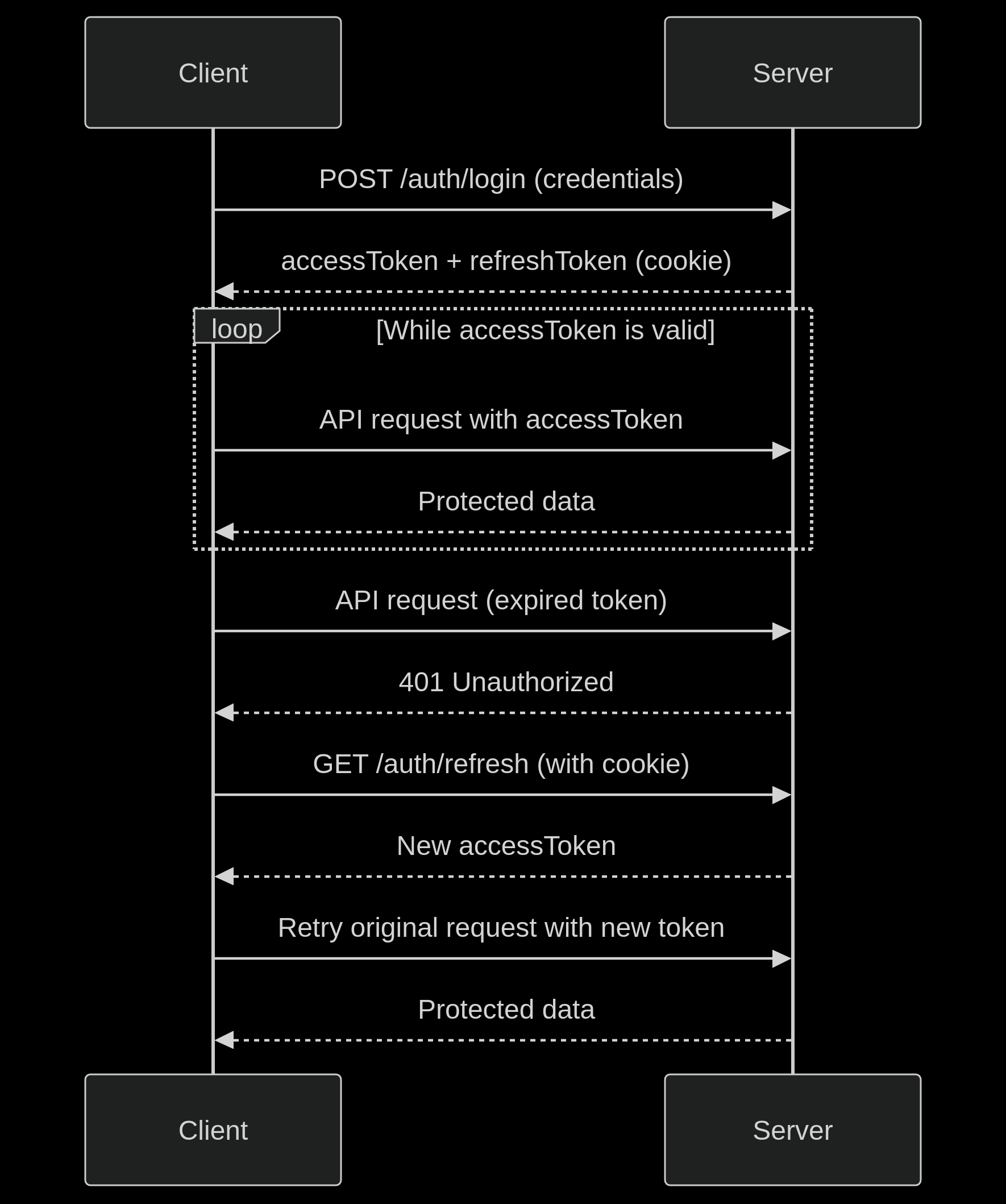
Description: After a successful login, the server sets a secure, HTTP-only refresh token cookie and returns a short-lived
accessToken(valid for 15 minutes). This endpoint allows you to obtain a new access token without requiring the user to log in again. -
How It Works: This endpoint reads the refresh token from the cookie and returns a new access token if the session is still valid. You should automatically call this using an Axios interceptor when receiving a
401 Unauthorizedresponse due to token expiry. -
Use Cases:
- ✅ Protected Routes: Use this endpoint to silently refresh tokens and allow users to continue accessing secured parts of your application without interruption.
- ✅ Authentication Check: When a user accesses a protected route, you can call this endpoint to validate their session and confirm they're still authenticated.
-
Learn More: For detailed implementation (including code for Axios interceptors and retry logic), see the full Token Management Guide.
5. Logout
- Endpoint:
POST /auth/logout
- Description: Logs out the user by invalidating the current session. This removes the associated refresh token (stored in a server-set HTTP-only cookie), effectively ending the session.
Flow Diagram
Error Handling
| Scenario | Action |
|---|---|
| Invalid/expired access token | Automatic refresh attempt |
| Failed refresh (invalid refresh token) | Redirect to login |
| 403 Forbidden | Check user permissions |
| Network errors | Retry logic or display error |
Security Considerations
-
Refresh Token Protection:
- Stored in HTTP-only, Secure, SameSite cookies
- Not accessible via JavaScript
-
Access Token:
- Short-lived (15 minutes)
- Stored in memory or localStorage
- Sent via Authorization header
Best Practices
- Always use HTTPS in production
- Implement proper token invalidation on logout
- Monitor for unusual token refresh patterns
- Set appropriate token lifetimes based on security requirements
- Consider implementing session timeout warnings